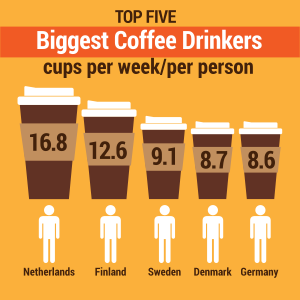
This is a svg file. A svg file is used for when you want an image to be fluid. The image can change based on what properties it is given. For example, this image transforms instantaneoulsly into a new image based on the size of the window it is viewed in. It makes the image's information easier to understand. For this svg, the classes of country name and country value are pretty standard. It just changes the color of the contry's name and the number associated with it. The same is true for the class of heading_b. the next part is a little tricky. The svg file contains 3 differnet images in it. They are all infographics, one big, one small, and one medium sized. The medium and small infographics are hidden with the rule #infographic_medium{display: none;} and #infographic_small{display: none;}. This means that the only infographic seen is the large one. That is, until the page size reaches 525 pixels. This is where we set the lowest amoun the at the large infographic wil lshow up. We do this using @media screen and (max-width: 525px). This means that once the screen becomes lower than 525 pixels wide, the large infographic will disappear. We want the medium inforgraphic to appear at this point, so we include 2 more rules, eliminating the large infographic and creating a rule that says the medium infographic will replace it. It looks like this: #infographic_large{display:none;} #infographic_medium{display:block;}. Now we want the small infographic to appear after the page becomes smaller than 400 pixels wide. So we add another @media screen and (max-width: 400px) and this creates a change at 400px. We finally put the rules that erase the large and medium infographics and replace them with the small infographic. #infographic_large{display:none;} #infographic_medium{display:none;} #infographic_small{display:block;}. Then we are done.